Techno

This Blog is mainly created to fulfil your techno thirst

Social Networking updates

Here you can get the instant updates about the socai Networking sites especialy Facbook and Google+

Come lets Geek

here you can learn some intresting and new geeks

Mobile phones

Learn some thing new for your mobile. gain some stuffs about smartphones

Browsers

Come lets know what is new with these browsers lets know about the updates, plugins and scripts

Thursday, December 22, 2011

How to Root Android - Samsung Galaxy fit


Step 1: Download this file Root Android.

Step 2: Extract the downloaded zip file.

Step 3: Open the folder and copy the Zip file and change the file name to update (update.zip).

Step 4: Connect your phone to your computer and paste the copied Zip file into the Memory card

Step 5: Now disconnect your phone from the computer.

Step 6: Switch off the phone and put in to the Recovery Mode.

Step 7: To get the recovery mode press and hold the Power button + Home button.

Step 8: Now you see your phone get in to the recovery mode. (In Recovery Mode your Touch screen will not work to move UP and DOWN use the Volume buttons and to SELECT use home button)

Step 9:In recovery mode you will get four options,

reboot system now

apply sdcard : update.zip

wipe data/factory reset

wipe cache partition

Step 10: Now select the option "apply sdcard : update.zip" some cases the option will be "apply update from sdcard"

Step 11: The files will get installed and you will see the message Installation completed.

Step12: Now select the option Reboot system. Now your Android phone is Rooted.

Note: The above steps were tested in Samsung Galaxy Fit and Samsung Galaxy Ace.

Share it in Facebook, Twitter and G+.

Any doubts post your Comments below.

Friday, November 11, 2011

Feel Siri On Android Phones

Want siri on Android Try these Apps

One of the most hyped features of recently launched iPhone 4S was Siri, the new voice assistant application for iPhone. I don't own an iPhone 4S and hence I can't comment on how good Siri works. But upon searching a bit, I found out that there are quite a few good Siri alternatives for Android readily available in the Android Market and most of them are free too. Here is quick collection of top free Siri alternatives for Android.

Vlingo
Vlingo Virtual Assistant is perhaps one of the best voice-powered Virtual Assistant on Android. I was pleasantly surprised with the quality of this app, both look-wise and the way it worked. From sending texts and emails to updating your Facebook/Twitter status to checking in with Foursquare, Vlingo does almost everything it is asked to effortlessly.

Speaktoit Assistant
Speaktoit Assistant app is yet another Siri alternative for Android that just works. With the image, name and everything, Speaktoit Assistant gives you an impression of something that is real. You can ask Jane anything under the sun and you get answers right away. Speaktoit Assistant answer questions, find information, launch apps and connect you with various web services, such as Google, Facebook, Twitter, Foursquare, and many others.

Skyvi
Skyvi is perhaps the application that I spend most time with among other Siri alternatives. All these voice assistant are not perfect. Mistakes often happen like you see in my screenshot above. But you will have a lot of fun for sure.

Iris
Iris is siri in reverse, yet another attempt to replicate or better the voice assistant application for iPhone called Siri. Does everything what you expect it to like making calls, searching the web, texting and so on. Iris even boasts of Android 4.0 Ice Cream Sandwich inspired UI.

AQ
AQ for Droid is the least rated application among the lot, though the screenshots and video looks pretty nice to me. Developer claims to have already been working on all the shortcomings, so expect an upgraded release of AQ for Droid very soon. I haven't tried it myself yet. You might want to give it shot anyway.


Samsung Glaxy Note a phone from Android family

A PHONE | TABLET

Samsung just sent a chill down our spine by launching the Samsung Galaxy Note- an Android Phone with a 5.3 inch display ! If you thought the Galaxy S2 had a big display ? Get ready for a bigger display. I’m not sure how many of us can grip a 5.3 inch phone in one hand ! The specs seem pretty impressive with a 1.4 GHz Dual Core Processor , 5.3 inch HD SuperAMOLED Plus display (1280×960 pixels resolution) and runs Android 2.3 Gingerbread. There is a 8MP camera on the back and a 2MP camera on the front. It weighs 100grams and is 12.3mm thick. And it comes with a pen called S Pen so that you can scribble on the mini football ground in your hands !


SPECS - GALAXY NOTE

PRELOADED SOFTWARE

Apart from the standard suite of Google apps, Samsung has loaded the Galaxy Note to the teeth with a myriad of apps. Some are handy, some border on bloatware.

To start, there are a number of 'S' apps such as the S Memo, the S Planner and S Choice apps store. All these 'S' labeled apps are designed especially for the S-Pen. While most will think the S-Pen is a glorified stylus, in truth it is a full-fledged digitizer. With the S-memo app, we can draw and sketch as if on paper. We can also take screenshots and edit them with the help of the S-Pen according to our whims and fancies. It pretty much became our personal digital notepad. We can even use handwriting recognition capabilities but these are not very accurate.

The S-Pen itself has a buttons placed which activates a variety of different features, such as taking screenshots.

The S-Planner is a calendar app optimized for the S-Pen, there is nothing revolutionary about it apart from cool quotient.

The S-choice is an apps store dedicated to apps optimized for the S-Pen. Samsung has also released a Software Developer Kit (SDK) for the S-Pen, allowing developers to build apps optimized for the S-Pen. As of now, the S-Choice store only offers 10 apps but Samsung expects the number will increase over time, but we are not entirely convinced.

Although the S-Pen is not the first of its kind in a mobile device, Samsung has definitely nailed the implementation. It is way better than the haphazard pen input on the HTC Flyer where the pen cannot be utilized throughout the OS. At the end of the day, however, it's still a novelty function - at least until the handwriting recognition algorithms are nailed because, in our opinion, only a superb handwriting experience will drive forward Pen based devices.

Besides the 'S' apps, Samsung has also loaded Polaris Office, which is a very capable office suite and also doubles as a file manager. It even supports the cloud with .Boxnet integration. It's a pity that .Boxnet does not offer the 50Gb free storage to its Android clients that it offers to iOS users, otherwise this would have been a lethal combination.

As with all Samsung devices, we get the Social Hub which is Samsung's social media aggregator. It integrates Twitter, Facebook, Email and SMS feeds in one. It's not the most intuitive way or not even the most handsome way of accessing ones personal information; frankly, we would rather use the default Facebook and Twitter apps for this.

Samsung has also loaded Kies Air Wi-Fi sync functionality, which works in tandem with a Kies Air desktop app or works directly via web browser. Definitely a handy tool, but Samsung could do a lot more to unclutter the interface especially in light of the iPhone's new found wireless capabilities thanks to iOS 5.

Sunday, September 4, 2011

Korea opens the world's first Virtual store

What is Virtual Store:
Shoppers download a related application on their smartphone and make purchases by taking photos of the bar codes.

Worlds first Virtual Store in Korea:
Home plus the nation's second largest discount chain had opend its fourth generation retail store(Virtual Store) at Seolleung station south Korea. its is offering 500 items including food, electronics, office supplies and toiletries at its "Virtual store"

The store has seven pillars and six screen doors plastered with store shelves with the products, which each carry a small bar code. Shoppers download a related application on their smartphone and make purchases by taking photos of the bar codes

How its work
If u place the order in the morning it will delivered to your home.In fact, consumers don’t have to be anywhere near the virtual store. For example, if you want to order replacements of a bottle of water that you have in your hand, you don’t have to stop by the subway station. You simply scan the bottle’s barcode with the Homeplus app. The products are delivered later to home or office.


Source: msnbc photoblog

Friday, September 2, 2011

How to add G+ Add to circles to your Blog


Still now there is no G+ Add to circles widget on Blogger. so i m here to show how to add G+ add to circles to your Blog.

Login to your Google plus account then click on the profile tag now look in to your address bar
copy the numbers within #**********/posts.


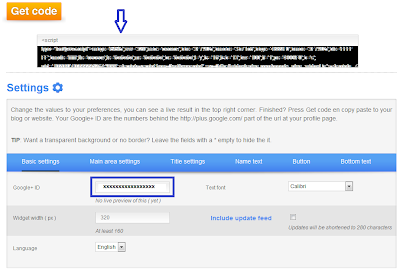
Now go to Widget plus and click on Get Widget, in the basic settings tab fill the Google+ id the number uou have copied from your adress bar. change the font, size and language according to your wish and click on Get code, copy the code and add it to your blog.


To add it to your blog
In the blogger dash boar click on Design and click on add Gadget now select HTML/Java script and paste the copied code in to the content box. Thats it you are done.


post your comment if any doubts.

Thursday, September 1, 2011

BlackBerry to run on new 7 os


RESEARCH In Motion (RIM) recently announced the upcoming arrival of a slew of new BlackBerry smartphones, including the brand new BlackBerry Curve 9360, which will be available in November.

RIM also said that all the new devices would run on the new BlackBerry 7 operating system (OS). The new OS allows for 40% faster web browsing. According to the SunSpider Javascript benchmark test, BlackBerry 7 renders Javascript in 2.84 seconds, almost equal to Apple's iPhone OS and twice as fast as the nearest Android OS.

The BlackBerry 7 OS utilises Liquid Graphics, which describes the look of the screen and how it feels to the user. It brings images to the screen in miliseconds, with a smooth, interactive interface and bold graphics.

This latter feature is especially important, as three of the upcoming mobile devices have touch screens. The first, the BlackBerry Bold 9900, has a slim profile that fits into palms and pockets perfectly. A 2.8-inch high resolution screen allows users to browse and read messages with ease, and with a smooth, user-friendly keypad, typing messages and emails is a joy.

Users can also view and shoot HD videos with the BlackBerry 9900, ensuring that they can mix business and pleasure with the handy device. It is scheduled for a Sept 15 launch, and will retail at RM2,188.

Also being introduced later this year is the BlackBerry Torch 9860. The full touchscreen device has the largest screen of all BlackBerry devices, at 3.69-inches, yet remains at a slim 11.5cm in width.

Besides HD video recording capabilities, it allows for three different keypad modes, ensuring that users will be able to type what they want, however they want.

There is also the BlackBerry Torch 9810, the more refined version of the previous Torch 9800. It has a sliding QWERTY keypad and a touchscreen for ease of use, and has a 1.2GHz processor. Users can surf the mobile web wherever they are at the fastest speed possible.

At the recent event to introduce the devices to the media, Calvin Wee, marketing manager of RIM also sang praises of the upcoming BlackBerry 9360. "We anticipate that it will be the next star of our successful Curve range," he said.

"You can see that we put a lot of thought into the device, from its functions all the way to its appearance. It is made from high quality materials, for a more sophisticated look."

Wee also said the BlackBerry 9360, as well as the other phones, would be enjoyable for users because of the brand new OS. "We at RIM are very pleased with the BlackBerry 7 OS," he said. "We are proud to have our new phones powered by it."

Sony's OLED Based 3D Glasses

It looks like it might have come straight off the set of Tron, but Sony's new prototype mixes headphones with 3D glasses which feature two OLED screens, each of which has a resolution of 1280 x 720 pixels


Will be expected in the market from November.

Worlds First Mango Device

At last we have a new generation Mango based Device ready for sales ,well at least for the Windows Phone enthusiasts in Japan its a great news.


Fujitsu Toshiba Launch it’s first Windows Phone IS12T powered by the latest update codenamed Mango ,which began shipping , courtesy KDDI Corporation and Okinawa Cellular Telephone Company.

Specifiaction of the phone
The phone is powered by Qualcomm MSM8655 chipset, 3.7 ” Display (WVGA),32 GB of built in memory,13.2 MegaPixel Camera and some of the interesting features which makes this phone a bit different from the other Windows Phone is that the phone is Water resistant and Dust resistant.The phone comes in three colors like Citrus,Magenta and Black.

On the Other side the Windows Phone manufacturers HTC ,Nokia,LG and Samsung are also gearing up for the release of the new breed of the Windows Phones powered by Mango.

How to disable and enable Email Notifications in New Facebook Interface

Today i am going to show how to enable and disable the email notifications in Facebook. even though some them know how to do still many of them don't know about this.

Step 1:
Login to your Facebook profile in the right corner click on Account tab.
Then click on Account settings.


Step2:
Now in the left corner click on the Notifications tab.
In the All notifications section you will see all catagories.


In the All notifications section rigth end you will see a edit option or jst click on the Email icon.

Step 3:
Now tick and untick the check boxes according to your wish.
If you wish to untick all the boxes jst give a click on that email icon vive versa for ticking all the boxes.

You can Toggle Email notification by clicking the email icon which is highlighted.
Thats it you are done, leave comments if you have any doubts.

Wednesday, August 31, 2011

iPhone 5 in September? No! It’s October! Whatever, but, Why?

Iphone 5


Since Apple threw the tech world into turmoil when they didn’t announce the iPhone 5 at WWDC this year, it has been one long round of rumors, leaks, dates and guesses as to when it will finally make an appearance. Although August has come up in a few of them, the middle of summer never really seemed likely, making September far more probable.

That would mean a very late August or very early September announcement; however yet another rumor – this time from a good source – has thrown another month into the mix. AllThingsDsay the iPhone 5 will be coming in October, making a September event more likely. In 2010, Apple held their music event and announced, amongst other things, the new iPod Nano; and the shake-up of their established schedule could see a combined iPod/iPhone event around the same time.
I’ve said it before, we won’t know the actual date until Apple wants us to know, but these potentially strategic date leaks do make me worry about one thing – what if all three months have been correct, and for whatever reason the new iPhone has been pushed back each time?

Some noise about an overheating A5 processor did do the rounds for a very short time, which would certainly cause a problem and as a redesign now seems almost certain, has Apple had even more trouble adapting the antenna?
Whilst the delay has upset buyers, fans and competitors, it has done a great job of creating even more anticipation for the new phone; and they really don’t need a repeat of what happened a short while after the iPhone 4’s release. Now fever pitch has been reached, Apple has got to produce something stellar to be worth the wait. The 8 megapixel camera and dual-core A5 processor are both fine; but if it’s still wearing the same 3.5″ screen Apple could hear murmurs of dissent from the waiting masses.

Has Apple pulled a Samsung (who rejigged their Galaxy 10.1 tablet after seeing the iPad 2) and decided to change their plans at the last minute? Has the iPhone 5 suffered from manufacturing or feature problems? Is the extended wait all just a strategic ruse to annoy the enemy? We’ll probably never find out (unless any problems still exist when the phone hits the shelves), but if October turns into November in the coming weeks; it could be safe to assume there’s a problem somewhere.

Tuesday, August 30, 2011

Jst for Gags

Jet Cat


Miss Universe - Miss Bean


Cool T-shirt


THREE GOOD GAMES FOR ANDROID

PAPER TOSS


Its a nice game for Android will be downloaded for free from the market.The wind will be blown through the fan we want to toss the paper correctly into the basket according to the speed of the wind.Having six levels worth to play.


FRUIT SLICE


Fruit slice free version can be downloaded from the market. our task is to slice the fruits with our fingers. diffrent types of modes will be there, nice to play.


FARM FRENZY


Farm frenzy is like farm ville we want to grow and sell the cattels sheeps and ducks and their products good entrainment game.

FACEBOOK CHAT SLANGS

Slang’s have become very common in chat’s,Sms,emails.People new to these slang’s find really difficult to understand converstion.On the other hand it saves a lot of time and effort if slang’s are used.I will give the most commonly used Slangs with there meanings that are used in facebook chat or SMS

.


Here are the Most Commonly used Facebook chat slang’s
ASAP As Soon As Possible

GN Good Night

M/F Are You Male or Female?

ASL Tell me your Age,Sex and Location

IDK I don’t Know

SD Sweet Dreams

BRB Be Right Back

JK Just Kidding

Tnx Thanks

BTW By The Way

K Okay

TY Thank You

ROFL Rolling on Floor Laughing

LOL Laugh out Loud

TTYL Talk to you later

FYI For Your Information

LMAO Laugh My Ass Out

WTF What The F**k

FB Facebook

LMFAO Laugh my f**king ass off

WTH What the hell

GM Good Morning

LMK Let Me Know

zzz Sleeping

BFF Best Friends Forever

Jk Just kidding

B4 Before

L8 Late

gr8 great

plz please

sry sorry

bbz babes

kk okay

kl cool


This List is far from Complete but it has the most commonly used slang codes in facebook chat.If I missed some then do share them with our readers by posting comments.

HOW TO SEND BOLD AND UNDERLINED TEXT ON FACEBOOK CHAT

People try to learn more and more facebook tricks so that they can amuse their friends.Well today I am going to teach you a cool facebook chat trick that most of the people are unaware of that is how to send bold and underlined text in facebook chat.This trick doesnot require any technical knowlege and it can be used by using just simple codes In the picture below you can see that I have sent bold and underlined text in facebook chat.


Now here are the facebook codes for sending bold and underlined text in facebook chat.

For Sending Bold Text
  • whatever you type between * *(two stars ) will automatically turns into bold.
  • Example : You write
    I *really* mean it.
    Turns to
    I
    really mean it.


For sending underlined Text
  • Whatever you type between _ _(two underscores) will automatically turns into underlined text
  • Example: You write
I really _mean_ it.
Turns to
I really
mean it
.


For writing Bold+Underline
  • Whatever you type between *_ _* will automatically turns into Bold+Underline
  • Example:
You *_mean_* it?
Turns to
You
mean it?

Twitter Delicious Facebook Digg Stumbleupon Favorites More